How to know if a MoMo payment is real
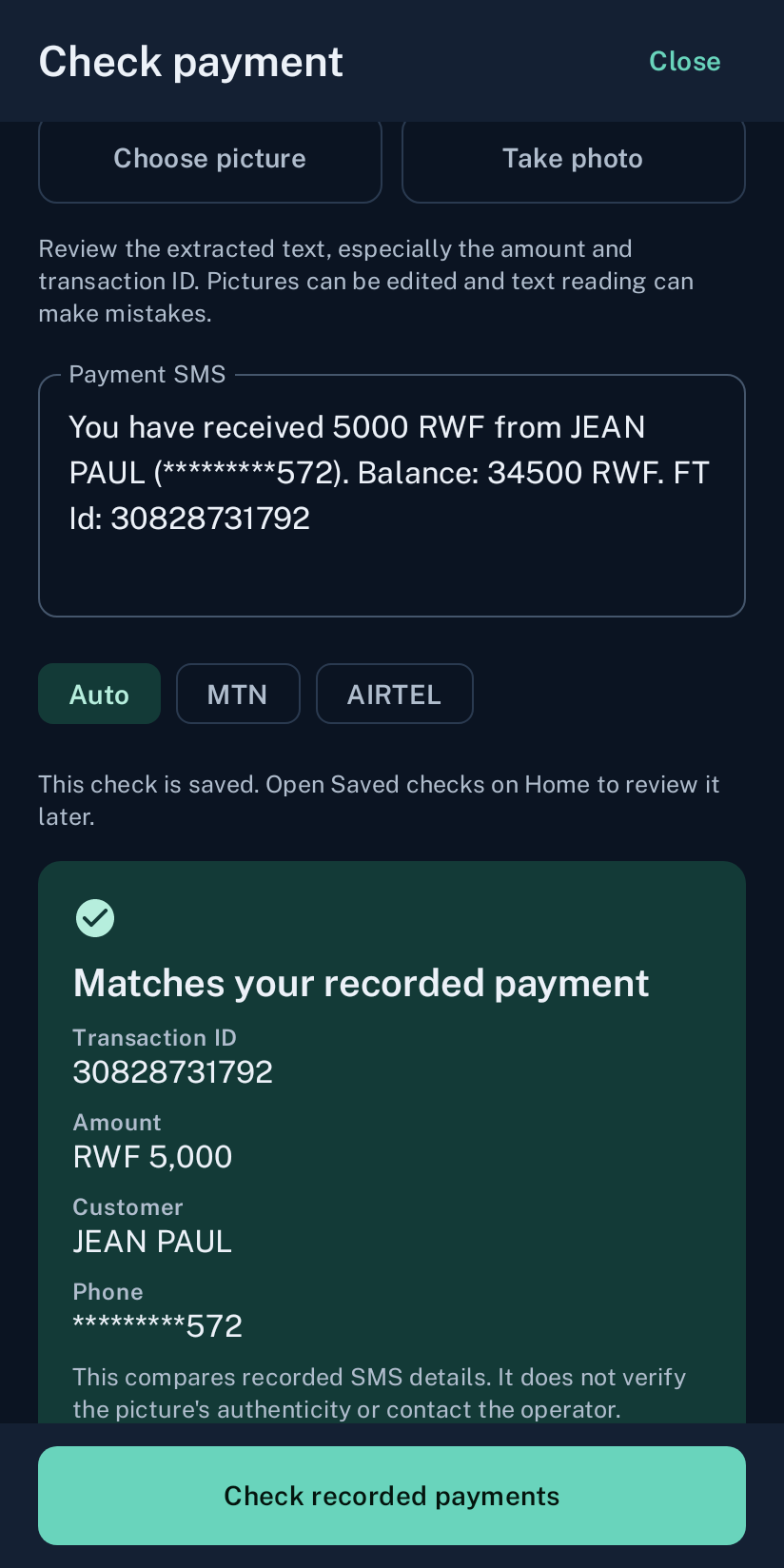
Before giving goods, compare the customer’s payment details with the receipt on your own receiving phone. A screenshot is useful information, but it is not proof that your shop received the money.
Start with your receiving account
First establish which MoMo number or merchant destination the customer paid. Check the Android phone and SIM that receive payment messages for that destination. A message from a customer’s phone describes what they submitted; the receipt recorded on your own receiving phone is the comparison point for WeConfirm.
For a counter sale, open the recorded payment in the app and compare it with the amount you expect for the goods. For an online order, use the verification result associated with that order and the receiving wallet assigned to its store.
Compare the reference, amount and receiving wallet
- Use the transaction reference from the actual payment message.
- Compare the received amount with the amount due.
- Check the operator and receiving wallet or SIM.
- Check that the receipt relates to the payment being claimed.
- Review whether that receipt has already been used for another order.
A similar amount or sender name alone is not enough to identify a payment. When the details disagree, pause the handover and ask for clarification. Do not alter the submitted reference to make it match another receipt.
Why a screenshot alone is insufficient
A screenshot can show incomplete details, an earlier payment or a payment sent to another destination. WeConfirm can read submitted text or details from an image and compare them with recorded receipts. It does not authenticate the picture and does not ask the operator to verify the screenshot.
When the receipt cannot be found, check the receiving account through the operator’s normal channel. Avoid asking the customer to pay a second time while you are still establishing the first payment’s outcome.
Understand a result that needs review
A confirmed result means the submitted details matched the recorded receipt under the check rules. A result needing review is a prompt to investigate. No match can also mean the receiving SMS has not arrived or the wrong wallet was selected. Online checks may expire if the assigned shop phone does not answer in time.
Keep the order identifier and payment reference together when contacting support. The merchant is responsible for the final decision where a receipt is unclear. A pending result should never be treated as a completed payment.
Keep one receipt attached to the right order
WeConfirm Pay tracks receipt use to prevent the same received payment from confirming more than one order. Do not fulfil a second order using a receipt already assigned to another order. If you think the assignment is wrong, review the original order and its result before changing your shop’s decision.
Protect payment details when asking for help
Send support the order or subscription reference and an explanation of the issue. Keep passwords, MoMo PINs, store API keys and full payment messages out of public comments and website questions. Support can tell you what limited details are needed for an investigation.
Build a routine your staff can follow
Use the same receiving destination, confirm the amount, review the recorded receipt and retain the sale or order reference. Test this process before a busy trading day. Staff should know how to pause an uncertain sale and who is allowed to approve a manual decision.